The settings menus
Everything in Tickiti other than the tickets themselves is reached from your account menu. Click your name at the bottom of the left-hand panel to open it.
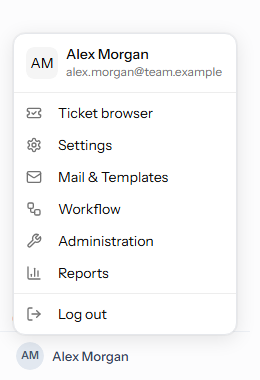
The account menu
- Ticket browser — back to your tickets.
- Settings — your own settings. Every member of staff has this menu.
- Mail & Templates, Workflow and Administration — how the system is set up. Administrators see these.
- Axial — the set-up of the AI assistant, for administrators (system administrators, on a self-hosted installation), when your plan includes it. Members of staff with Manage access to Axial see its Gaps page here, and administrators among them its Reports page too.
- Supervisor — background jobs and system health, for the people who run the Tickiti installation itself.
- Reports — reports, for administrators, when your plan includes them.
- CRM — opens the CRM in a new tab, on an installation that has one, for staff with CRM access. See CRM integration.
- Log out.
A customer’s account menu holds their name and Log out. On a phone the menu offers Log out; the settings pages are used from a computer.
The side menu
Choosing Settings, Mail & Templates, Workflow, Administration, Axial, Supervisor or Reports replaces the perspectives panel on the left with that menu’s pages, in alphabetical order, each with a one-line description. Click a page to open it. To move to another menu, open the account menu again; the Tickiti logo at the top left takes you back to the ticket browser.
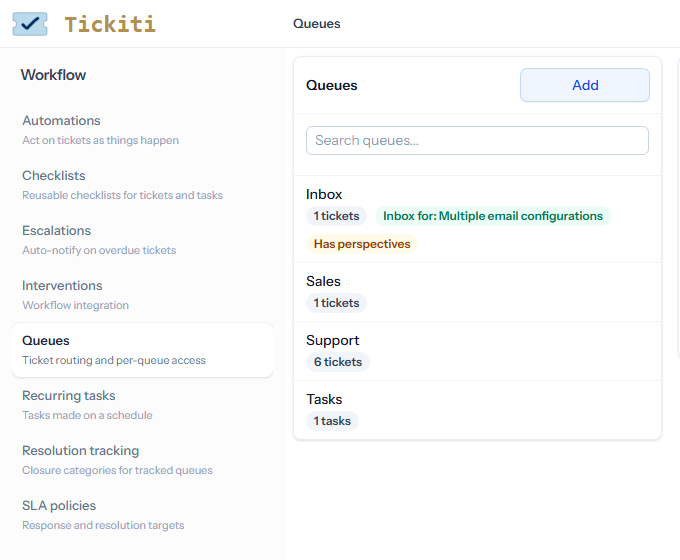
The documentation names a page by its menu and its name, for example Workflow → Queues.
What each menu holds
Settings
Availability, Hashtags, Perspectives, Profile, Stock responses and Watch lists.
Mail & Templates
Attachments, Excluded emails, Mailboxes, Sent mail, Subjects and Templates. Excluded emails, Subjects and Sent mail are described under Mailbox setup.
Workflow
Automations, Checklists, Escalations, Interventions, Queues, Recurring tasks, Resolution tracking and SLA policies.
Administration
API keys, Branding, Custom domain (on a site hosted by Tickiti), FAQs, Licence, Storage, System settings, Teams and User admin.
Reports
Agent Activity, Resolutions, Response Times, SLA, Satisfaction and Volumes. See Reports and analytics and SLA and satisfaction reports.
Pages your plan does not include
Some pages depend on your plan: Automations, Escalations, Interventions, Resolution tracking and SLA policies under Workflow, API keys under Administration, and the SLA and Satisfaction reports. They stay in the menu. Clicking one your plan does not include opens a message naming the plan that does, instead of the page.