Axial reports
When Axial has written a suggested response for a customer’s message, the member of staff who sends the reply is asked how they used it (see Rating Axial’s content). Axial → Reports gathers those ratings, so you can see how often Axial’s work is used, by whom, and for which kinds of query.
Reports is open to administrators with Manage access to Axial. It is in the account menu under Axial. On a self-hosted installation, an administrator who is not a system administrator finds it there as the only page besides Gaps. The ratings name the staff who gave them.
Choosing the range
Set From date and To date, or click a preset: Today, Last 7 days, Last 30 days (where the page opens), This month, Last month or Last 12 months. The range is of when the reply went. Period groups the figures over time by day, week or month.
The figures
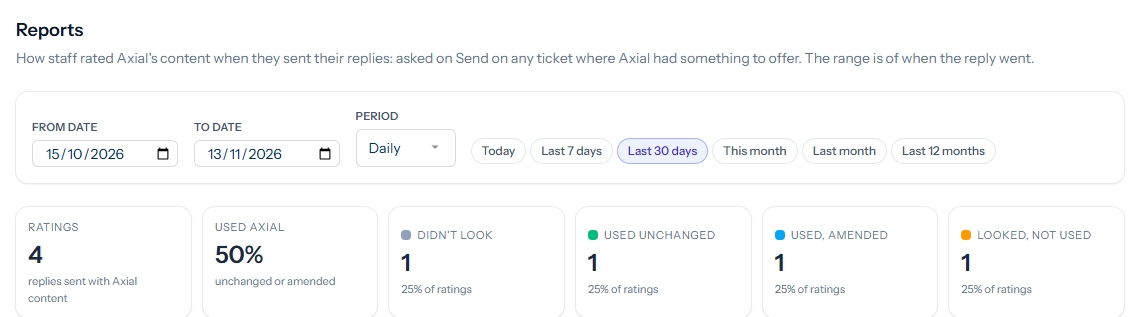
- Ratings: the replies sent with Axial content in the range.
- Used Axial: the share that used it, unchanged or amended.
- One figure for each rating: Didn’t look, Used unchanged, Used, amended and Looked, not used.
Below them, three tables count each kind of rating Over time, By person and By skill, with a bar showing the mix. By skill names the skill Axial used; No skill is a reply where Axial chose none.

A skill that is often amended or not used is the place to look first: its guidance may be missing something staff keep adding.
The list of ratings
Every rating in the range is listed, newest first: when the reply went, the ticket and its subject, who sent it, the rating and any explanation they gave. Under the subject you see the kind of message (Public message, External message or Internal note), sent later for a scheduled reply, the skill and the version of the suggested response that was rated. Click a ticket number to open the ticket at that message.
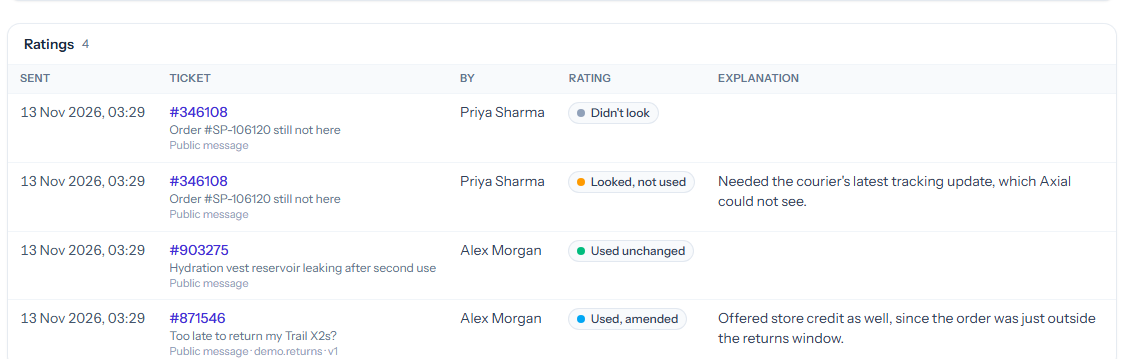
To narrow the list, click a rating’s figure, a person, a skill or a count in the tables. Each filter shows above the list; click its × to remove it. Filters narrow only the list: the figures and tables always cover the whole range. The list shows up to the latest 500 ratings.
The explanations are the most useful part of the report. When staff say what they changed or why they did not use a suggestion, that is what to add to a skill’s guidance, or to log as a gap.