Licence
The Licence page shows your plan, how many staff it covers, when it renews and whether it is active. It is at Administration → Licence, for administrators. On a self-hosted installation it is also where you register your licence key.
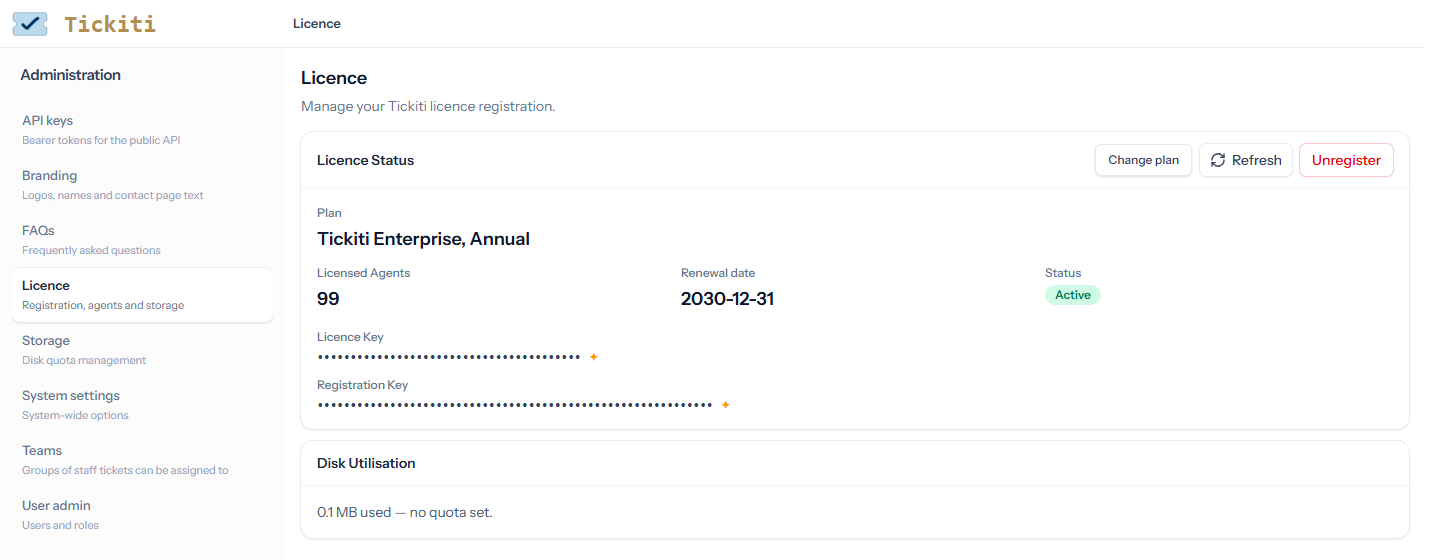
Licence status
- Plan — the product your licence is for.
- Licensed Agents — how many staff accounts the plan covers. Every staff account counts, whether or not that person signs in.
- Renewal date — when the licence runs out unless it is renewed. A demo shows Demo expires instead, and a Demo label beside the status.
- Status — one of the states below.
- Licence Key and Registration Key — click either to copy it. Keep both private.
| Status | What it means |
|---|---|
| Active | The licence is valid and in date. |
| Grace Period | The renewal date has passed, within the last 7 days. Staff see a warning when they sign in and can carry on. |
| Expired | More than 7 days past the renewal date. Staff cannot use Tickiti until the licence is renewed. |
| Seats Exceeded | There are more staff accounts than licensed agents. Staff cannot use Tickiti until there are fewer staff accounts or a larger plan. |
| Invalid | The registration does not match this installation, for example after moving it to another server. Register the licence again. |
Customers are not affected by any of these: they can still raise tickets and reply.
When staff are blocked
When the licence has expired or has too few seats, staff who sign in see a page that says why. An administrator can still open the Licence and Disk storage pages, and, when there are too many staff accounts, the user list in User management, so the cause can be put right. Administrators also get a link there to buy or change the plan.
The same happens when your files have been over your plan’s storage allowance for 8 days in a row; see Disk storage.
Changing your plan
Change plan opens your plan’s page, with your current staff count and storage use filled in, where you can add agents or storage, or change your plan. On a demo the button reads Purchase, and the days left on the demo carry over to the plan you buy. Refresh reads your licence again after a change, so a new renewal date or seat count shows at once.
Registering a self-hosted installation
A newly installed system has no licence, and administrators who sign in are taken to this page.
- Type your 40-character licence key in Licence Key.
- Click Register. Tickiti contacts the licence server, which ties the licence to this installation and returns your plan, seats and renewal date.
Unregister releases the licence from this installation, for example before moving to a new server. The number of times a licence can be unregistered is limited, and staff access stops until a licence is registered again.
On a site hosted by Tickiti, the licence is set up for you and there is no Unregister button.
Disk utilisation
The page also shows how much storage your attachments and sent mail use, against your plan’s allowance where it has one. See Disk storage for the breakdown and for freeing up space.