Disk storage
The Disk storage page shows how much space your attachments and sent mail take, sets how long sent mail is kept, and frees up space. It is at Administration → Storage, for administrators.
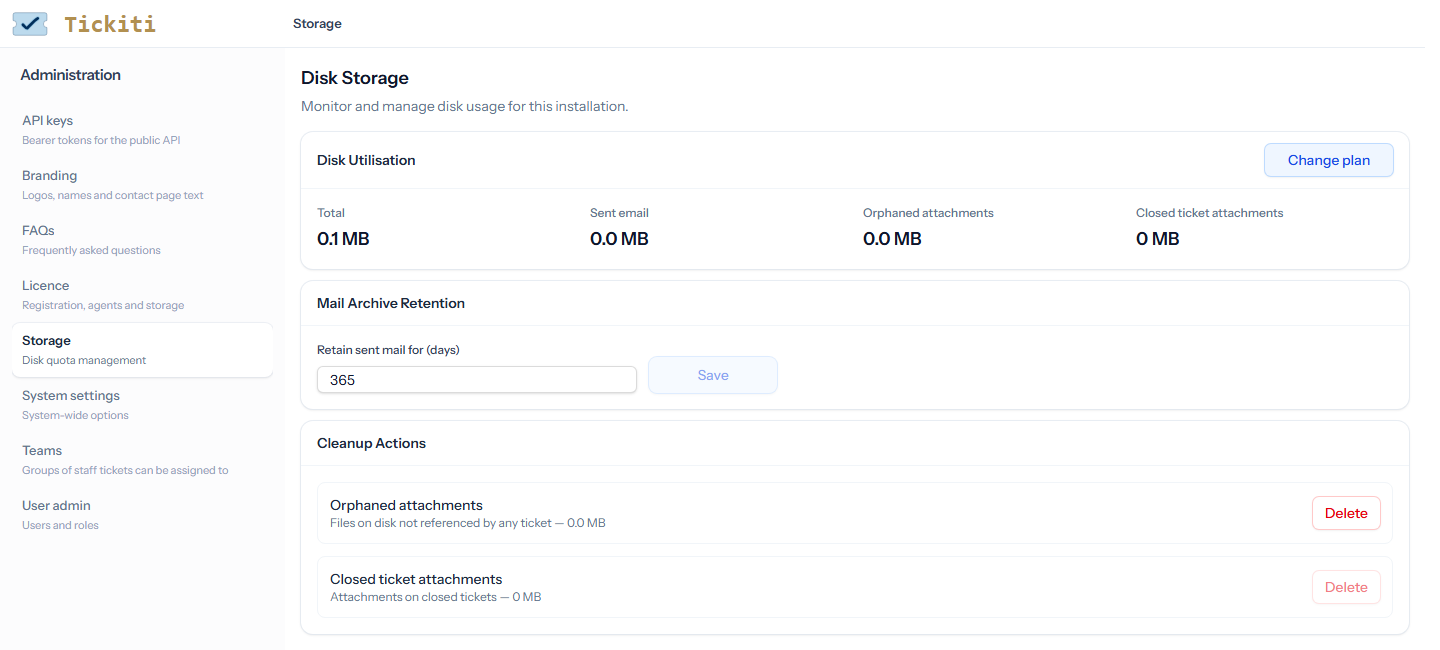
Disk utilisation
- Total — everything Tickiti stores as files: attachments, the sent mail archive and your logos. Where your plan has a storage allowance, a bar shows how much of it is used: green, amber above 80%, red once it is over.
- Sent email — the archive behind Sent mail.
- Orphaned attachments — stored files that no message, note or unsent draft uses any more.
- Closed ticket attachments — the files attached to closed tickets and tasks.
Change plan opens your plan’s page, with your current use filled in, where you can add storage.
Going over the allowance
Tickiti checks its storage every night. On the first night over your plan’s allowance it raises a ticket, Disk storage allowance exceeded, and on the fifth night an urgent reminder. Once storage has been over the allowance for 8 nights in a row, staff cannot use Tickiti until it is back under, by freeing up space or adding storage. Administrators can still reach this page and the Licence page. Customers are not affected.
Mail archive retention
Retain sent mail for (days) sets how long copies of sent emails are kept, from 1 to 3650 days; the default is 365. Copies older than that are removed every night. Shortening it asks you to confirm, because the older copies are then removed straight away and cannot be brought back. Tickets and tasks are not affected.
Freeing up space
Both clean-up actions delete files for good. Each asks you to confirm first, and neither can be undone.
- Orphaned attachments — Delete removes the stored files that nothing uses. Every ticket, task and draft keeps its attachments.
- Closed ticket attachments — Delete asks for a number of days (90 to start with) and removes the attachments of messages and notes older than that on closed tickets and tasks. The messages and notes stay, without their files. A file that an open ticket or task, a newer message or note, or a draft also uses is kept for them.
The figures are recalculated in the background after a clean-up, so they can take a minute to change.
Related
- Licence — your plan, seats and allowance.
- Attachments and files — how attachments work on tickets.