Axial: models, limits and usage
The Models & limits page of the Axial menu chooses the models Axial uses and sets how far one run may go before it has to answer. Usage shows what the model calls cost. Open them from your account menu: Axial → Models & limits and Axial → Usage.
The settings save as soon as you change them. Most installations can leave them as they are.
On a site hosted by Tickiti, Tickiti chooses the models and sets the limits for you, so these pages are not in your Axial menu.
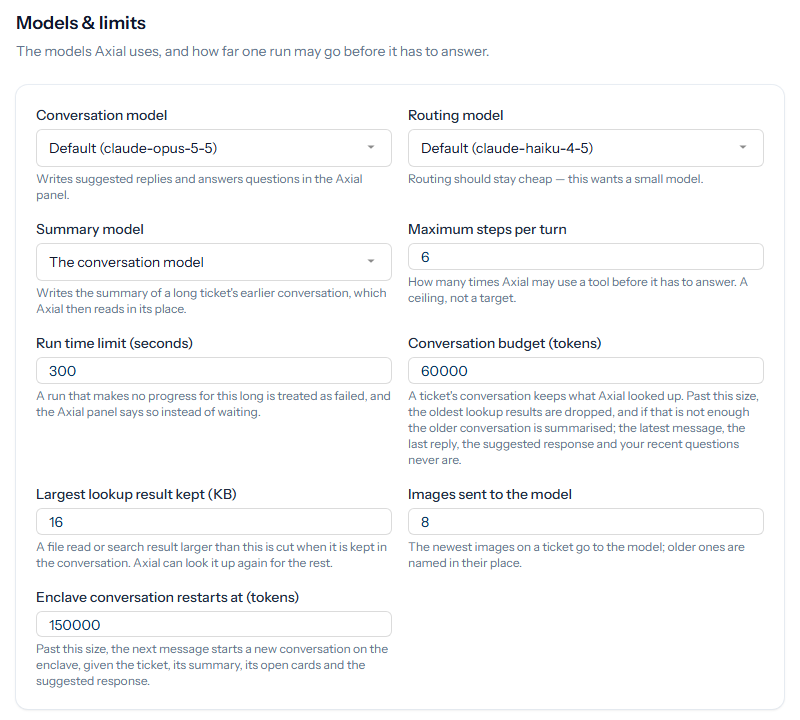
Models
Each picker lists the models available to your installation. Default uses the model named in brackets.
- Conversation model: writes the suggested replies and answers questions in the Axial panel. This is the model that matters most to the quality of the replies.
- Routing model: chooses the skill for each query. Routing runs on every message, so it should stay a small, cheap model.
- Summary model: writes the summary of a long ticket’s earlier conversation, which Axial then reads in its place. By default it is the conversation model.
The model for the final check of each reply is chosen on Replies.
Limits
- Maximum steps per turn (1 to 20, default 6): how many times Axial may use a tool before it has to answer. A ceiling, not a target.
- Run time limit (30 to 3,600 seconds, default 300): a run that makes no progress for this long is treated as failed, and the Axial panel says so.
- Conversation budget (8,000 to 500,000 tokens, default 60,000): Axial keeps what it looked up in the ticket’s conversation. Past this size, the oldest lookup results are dropped first, and then the older conversation is summarised. The latest message, the last reply, the suggested response and recent questions from staff are always kept.
- Largest lookup result kept (1 to 512 KB, default 16): a file read or search result larger than this is cut when it is kept. Axial can look it up again for the rest.
- Images sent to the model (1 to 50, default 8): the newest images on a ticket go to the model; older ones are named in their place.
Settings for Axial on your own servers
Two settings apply only where Axial works on systems inside your own network, through the Axial drone:
- Enclave conversation restarts at (tokens): past this size, the next message starts a new conversation on the enclave, given the ticket, its summary, its open cards and the suggested response.
- Tools a task may use without an action: a task can use any tool that one of Axial’s actions covers, as that action allows. Any other tool on your servers it can use only if it is listed here, one name a line, as the server names it. Writing
mcp__server__toolopens a tool on that server only. When the list is set on the server, the page shows it and cannot change it.
Usage
The Usage page shows the tokens, calls and estimated cost of the model calls made by your installation, Axial’s among them, for this month and for all time. Costs are estimated from the models’ list prices, with cached input at its reduced rate. When a call used a model with no price set, the cost is shown with ≈ as a lower bound.
Usage is shown only to superusers. The setting that most affects cost is on Inbound messages: with Axial answering messages as they arrive, every customer message spends a routing call and a working run.