Dictation
With dictation, you can speak your question to Axial instead of typing it. A microphone in the Axial panel’s question box turns what you say into text, which you can check and change before you send it.
Dictation is offered where your installation has a transcription service set up and Axial is on. Where it is not, the profile shows no Dictation section and the panel has no microphone.
Turning it on for yourself
- Open Settings → Profile from your account menu.
- In the Dictation section, tick Enable Axial dictation. It saves straight away.
Your speech is sent to the transcription service for this installation and nowhere else. Nothing you say is stored: the recording is not kept with the ticket.
Dictating a question
- In a ticket’s Axial panel, click the microphone beside the question box. The first time, your browser asks for permission to use the microphone.
- Speak. The panel shows Listening and how long you have been talking, and your words appear in the box as you speak. The last few may change as more is heard.
- Click the stop button. The panel shows Finishing, then Tidying, and the accurate reading of the whole dictation, tidied using the dictation vocabulary, replaces what appeared while you spoke.
- Check the text, change anything you need, and send it as usual.
If you type in the box while dictating, or send or clear it, the late reading is not put back over what you did.
The dictation vocabulary
A transcriber spells what it hears, so product names, order numbers and jargon are easily misheard. The vocabulary is a short list of the terms dictation should expect, given to the transcriber before it listens.
An administrator sets the list for everyone on Axial → Dictation. Enter one term per line, or separate them with commas. It saves when you click away.
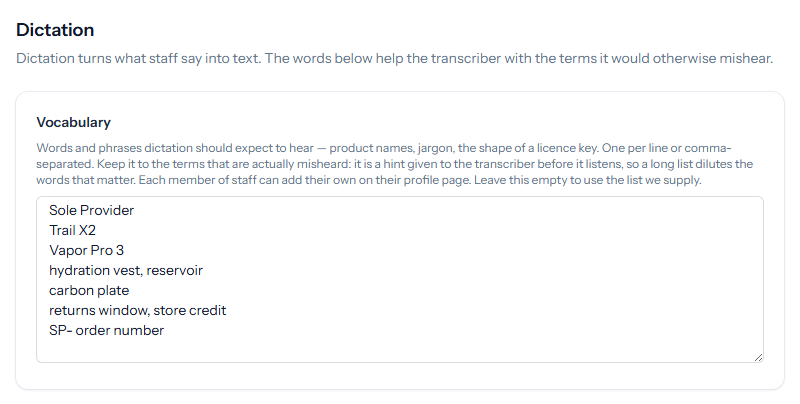
- Keep it to the terms that are actually misheard. It is a hint, not a dictionary, and a long list dilutes the words that matter.
- Left empty, a list of Tickiti’s own terms is used: ticket, task, message, note, queue, stock response, perspective and the like. A list of your own replaces it, so include any of those your team says often.
Each member of staff can add terms of their own on their profile, under My dictation vocabulary: customer names or products they mention often. The profile also shows the administrator’s list, read-only. Personal terms are added after the administrator’s list. The combined list has a fixed size, so if it is too long, personal terms are left out first.
Where your skills are kept in a git repository, the vocabulary is kept there with them (see Axial skill store).