Axial: replies
The Replies page of the Axial menu sets what Axial knows about your business and how it sounds, the language it replies in, and what happens to a suggested reply before staff see it. It is also where you let Axial send replies without review. Open it from your account menu: Axial → Replies.
Tone, business knowledge and sign-off
These three fields are saved together with the Save button under them.
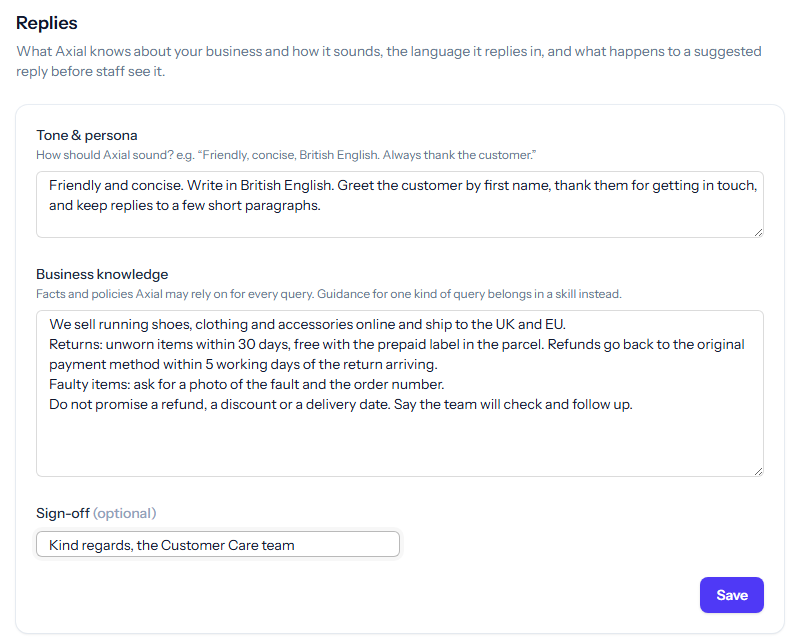
- Tone & persona: how Axial should sound. Keep it to a few concrete lines: how warm or formal to be, the spelling to use, how long replies should run, and what to do when unsure. For example: “Friendly and concise. Write in British English. Greet the customer by first name and keep replies to a few short paragraphs.”
- Business knowledge: the facts and policies Axial may rely on for every query, such as what you sell, your returns and refund policy, your opening hours, and what it must never promise. Short headed sections work better than long prose. Guidance that applies to one kind of query belongs in a skill instead.
- Sign-off (optional): the closing line of Axial’s suggested replies, such as Kind regards, the Support Team.
Reply language
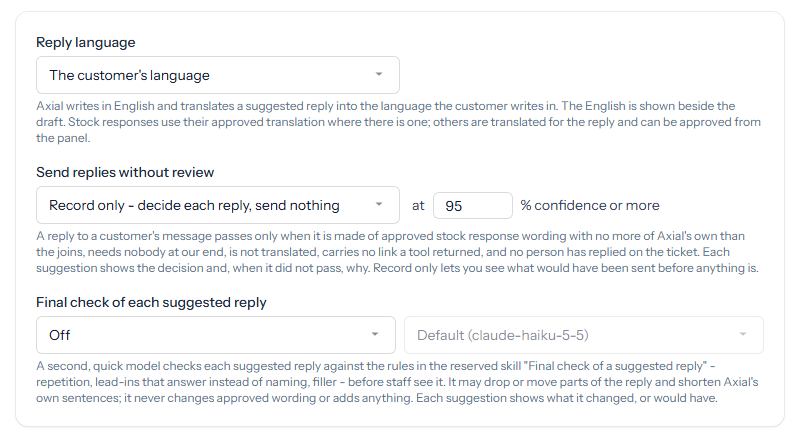
- The customer’s language: Axial writes in English and translates the suggested reply into the language the customer writes in. The English is shown beside the draft for staff. A stock response with an approved translation is used in that translation; others are translated for the reply, and staff with Manage access can approve those translations from the Axial panel.
- Always English: replies are not translated.
The other settings on this page save as soon as you change them.
Send replies without review
This is the one setting that lets Axial send a reply to a customer with nobody looking at it.
- Off: a person sends every reply. This is the starting setting.
- Record only: Axial decides, for each suggested reply to a customer’s message, whether it would have sent it, and records the decision. Nothing is sent.
- On: a reply that passes is sent to the customer straight away, from the system account.
With Record only or On, set the confidence a reply needs, from 50% to 100% (95% to start with). A reply passes only when every one of these holds:
- It is Axial’s suggested reply to a customer’s message, and its confidence is at or above your figure. A reply a member of staff asked for in the panel is theirs to send.
- It is made of your approved stock response wording, with no more of Axial’s own words than the joins between them, and those words hold no number, price or address.
- Nobody at your end needs to act: it is not marked needs a person, it uses no stock response marked Hands over to a person, no question is waiting for staff, and Axial left no note for staff.
- Every lookup it made succeeded, it is not translated, and it carries no link that one of Axial’s tools returned.
- The ticket is not a task, no person has replied to the customer on it, nobody has worked on it since Axial started, and the customer has not written again since.
- The customer’s message did not ask for no automatic reply, and the ticket has not already had two automatic replies in the past day.
Each suggestion in the Axial panel shows the decision (auto-sent, would auto-send or not auto-sent) and, when it did not pass, why. Running with Record only for a while lets you see what would have been sent before anything is. A rerun of Axial on a ticket is only ever recorded, never sent.
Once replies have been sent, the page lists them under Replies Axial sent automatically, with the ticket, the time and the confidence of each.
Sending can also be stopped for the whole installation. When it is and your setting is On, the page says so under the setting: replies are still decided and recorded, none is sent, and your setting applies again when sending resumes.
Final check of each suggested reply
A second, quick model can check each suggested reply before staff see it, against the rules in the reserved skill Final check of a suggested reply: repetition, lead-ins, filler. It may drop or move parts of the reply and shorten Axial’s own sentences. It never changes approved wording and never adds anything.
- Off: no check.
- Record only: each suggestion shows what the check would change, without changing it.
- On: the changes are applied, and each suggestion shows what was changed.
The picker beside it chooses the model for the check; the default is named in the list. On a site hosted by Tickiti, Tickiti chooses the model and the picker is not shown.