Resolution categories
On a queue that tracks resolutions, closing a ticket asks Was this ticket resolved? and the person closing it picks a resolution category, such as Resolved or Advice given. The Resolutions report then counts the closed tickets in each category. Administrators manage the categories at Workflow → Resolution tracking.
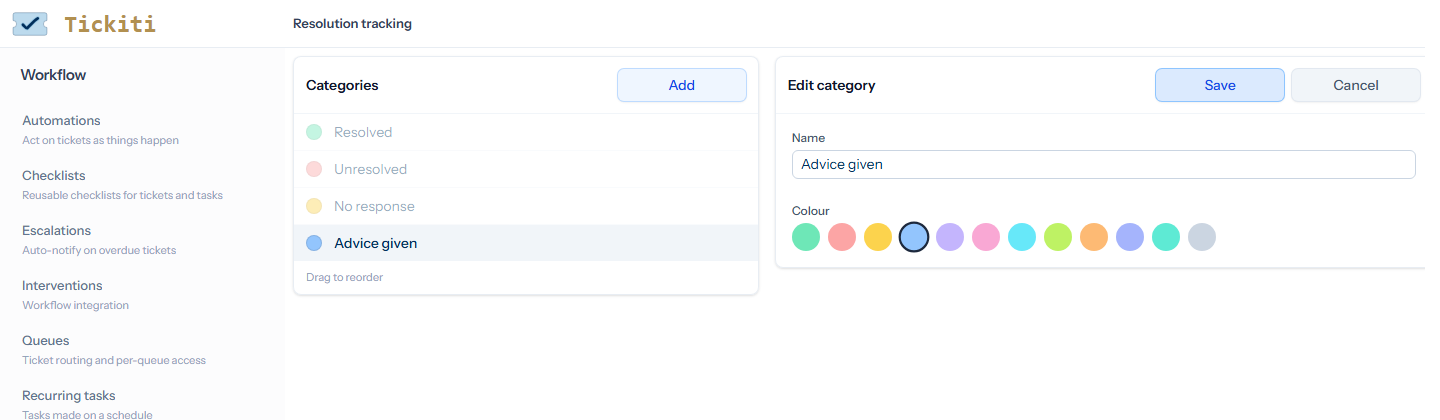
The categories
Tickiti starts with four: Resolved, Unresolved, No response and Advice given. Each has a name and a colour, which the close dialog and the report use. The close dialog offers them in the order of this list.
- Add — click Add, type a Name, choose a Colour and click Save. The new category goes to the end of the list.
- Change — select a category, click Edit, change its name or colour and click Save. Tickets already closed with it keep it, under its new name.
- Reorder — drag a category up or down the list.
- Delete — select a category and click Delete. A category that any ticket uses cannot be deleted; the message says how many tickets use it. Rename it instead.
The Resolutions report can also show Other reason, which holds the outcome of tickets closed before the categories were introduced. It is not offered when closing and is not in this list.
Which queues ask
Only queues with Track resolutions turned on ask for a category; set it on the queue in Queue configuration. Closing a ticket on any other queue asks nothing. Through the API, closing a ticket on a tracked queue needs a category, given by its id or name; see Reply to ticket API.
Resolution tracking is part of some plans. On a plan without it, choosing Resolution tracking in the Workflow menu offers an upgrade instead.