Axial: inbound messages
The Inbound messages page of the Axial menu decides which customer messages Axial works on as they arrive, so that its suggested response is waiting when an agent opens the ticket. Open it from your account menu: Axial → Inbound messages. Each setting saves as soon as you change it.
Staff can ask Axial on any ticket from its panel, whatever is set here.
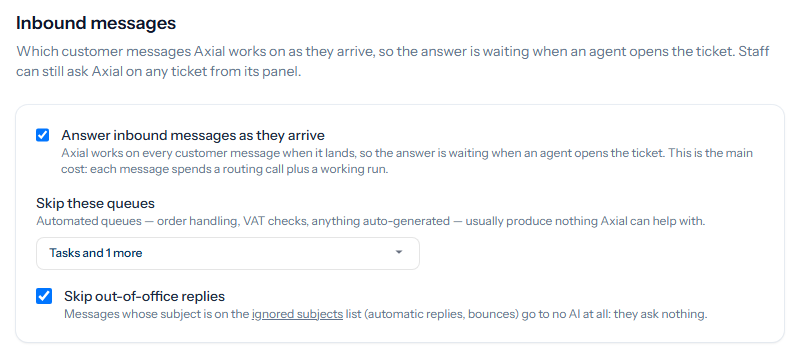
Answering messages as they arrive
With Answer inbound messages as they arrive ticked, Axial works on every customer message when it lands: it chooses a skill and writes a suggested response. This is where most of Axial’s cost comes from, since each message spends a routing call and a working run. Untick it and Axial works on a ticket only when a member of staff asks it to.
Only a customer’s message starts Axial. Staff replies and internal notes do not. A message with no text and only attachments is worked on as such, with the files named.
Skip these queues
Choose the queues whose messages Axial should leave alone. Automated queues, such as order handling or anything generated by another system, usually hold nothing Axial can help with. Click the box, tick the queues, and click Done; the box then shows the queues chosen.
Skip out-of-office replies
With Skip out-of-office replies ticked, a message whose subject is on your ignored subjects list (Mail & Templates → Subjects) goes to no AI at all. Automatic replies and bounces ask nothing, and answering one could start a loop with the other side’s auto-responder.
Other messages Axial leaves alone
- A ticket a person has taken over. Once a member of staff replies with something other than Axial’s suggestion, the customer’s later messages on that ticket no longer start Axial. The panel says so and offers Turn back on.
- When an allowance is used. A trial running on the shared key has an allowance of Axial runs, and your installation may set limits too, such as how many of one sender’s messages Axial works on in a day.
- Tasks. A task holds staff notes, and its notes never start Axial. Mail about a task from anyone who is not staff opens a ticket of its own, and Axial works on that ticket as usual.
A sender whose message asks for no automatic reply still gets a suggested response for staff. Axial never sends a reply without review to such a message.